Fix NanoBanana Sizing Issue How to Make Perfect 16:9 Thumbnails
AI TOOLS
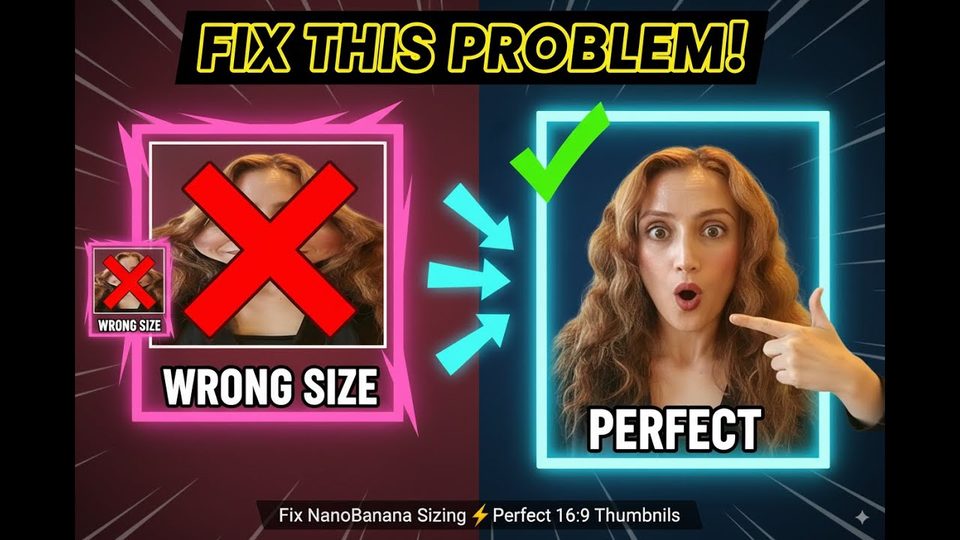
How Do You Fix Nano Banana's Sizing Issue for 16:9 Thumbnails?
In short: Nano Banana always outputs an image with the input picture's aspect ratio, so a square input produces a square result regardless of the prompt.
Key takeaways
- Nano Banana always outputs an image with the input picture's aspect ratio, so a square input produces a square result regardless of the prompt.
- Prompting for a new ratio or adding a blank black reference image does not work cleanly; the black picture approach changed the ratio but leaked parts of the black image into the result.
- The reliable fix is to resize the input to 16:9 in ChatGPT first, then run the exact same Nano Banana prompt with the resized picture.
Google's Nano Banana is strong at visualization, but it inherits the aspect ratio of whatever image you feed it. In this tutorial, tech consultant Ani Björkström demonstrates the problem with a square photo intended for a 16:9 YouTube thumbnail and shows the workaround that produces the correct size.
Why does Nano Banana ignore my requested aspect ratio?
Because that is how Nano Banana works: it always outputs a picture with the sizing of the input picture. In the demo, the source photo is square, the prompt asks for a 16:9 thumbnail, and the result comes back square anyway, unusable as a YouTube thumbnail.
Does uploading a blank reference image fix the ratio?
Not reliably. One attempted fix was uploading a black picture with the correct ratio alongside the original and asking the model to match the first picture's sizing to the second. The ratio did update, but parts of the black picture appeared in the output.
| Approach | Result |
|---|---|
| Prompting Nano Banana for a 16:9 output | Output stays at the input's square ratio |
| Adding a black 16:9 reference picture | Ratio changes, but parts of the black image bleed into the result |
| Resizing the input to 16:9 in ChatGPT first | Correctly sized thumbnail with the same prompt |
What is the working workflow for a 16:9 thumbnail?
Send your square picture to ChatGPT, ask it to resize the image to 16:9, and download the result. Back in Nano Banana, use exactly the same prompt, upload the correctly sized picture, and run it. Because the input now has the right ratio, the output does too, and Nano Banana can do what it does best: create the visualization and insert text.
FAQ
Can I fix the ratio with a better prompt alone?
No. Different prompts were tested and the output kept the input picture's sizing every time, since the model always mirrors the input's aspect ratio.
Do I have to use ChatGPT for the resize?
ChatGPT is the tool used in the tutorial, but the point is to use ChatGPT or another LLM to resize the input picture before generation; the correct input ratio is what matters.
Full transcript of the video (430 words, 4 sections)
0:00 Hey guys, my name is Annie. I'm a tech consultant and in this video I will show you how sizing in Google's Nano Banana works. Practically I have a prompt here and I want to create a thumbnail for this video that I'm doing right now and I want to use one of my pictures for the thumbnail. However, the picture that I want to use doesn't have the correct sizing. So if I go to my computer and I choose the picture, you can see that my current picture is square. But I want Nano Banana to create 169 ratio picture in order for me to use it as YouTube thumbnail. If I click on run, it will take couple of seconds and then let's see the result.
0:46 What I'm expecting is that the result here result picture has the same sizing that the input picture had. Result picture is square and this mean that we cannot use this as YouTube thumbnail. And how to fix this issues? I actually try to use different prompts and I try to use a blank picture. for example, upload the black picture here and then ask to change the sizing of the first picture to the sizing of the second black picture that had the correct ratio. But what what was happening that the ratio was updated but also some parts of the black picture was shown in the first year. So the best way of managing this is just going to chat GPT sending your initial picture.
1:34 Here you can see the picture that is square and then asking chat GPT can you resize this picture to 69 and then when we have the correct picture we will just download that one and then we come back to Nano Banana we use exactly the same prompt here and then we will upload the picture with the sizing that we want the size that JPD created for us this one and then we will run it and let's see this is moment of truth again just how nano banana works it always outputs a picture with the sizing of input pictures here I have the picture with the right size you will do you will always use chat GPT or another LLM to do the resize sizing for the input picture and then you will use the correct size on your input picture and Nano Banana will do what Nano Banana does best.
2:46 It will create the visualization and also it will manage to insert text without have a good day. Bye.
Want this working inside your finance team?
Ani Björkström — founder of QvantX Sweden AB, a Stockholm consultancy building AI solutions for banks, asset managers and finance teams. Anthropic partner. Every article starts from a real client build, minus the confidential parts. LinkedIn →
Keep reading — Automation
 I Built a Full n8n Workflow in Minutes Using Claude AI (FREE TOOLS)
 Claude Code Skills Just Changed How I Make CVs
 How to build a FREE Lead Generation Machine with n8n + Google Maps + Gmail (Free Template) - 2025
More: all 54 articles · Claude vs ChatGPT for finance · best AI tools for finance teams · work with QvantX